Slot Machine PCB Maintenance Guide: Troubleshooting and Preventive Care
Why Slot Machine PCB Maintenance Matters
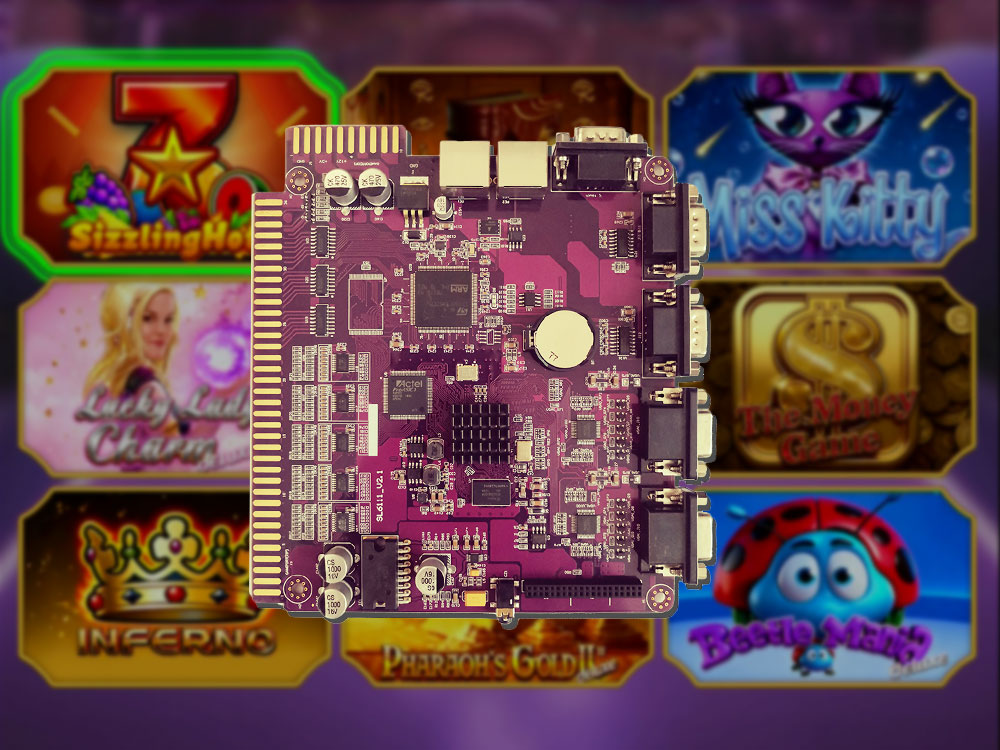
A slot machine’s PCB (Printed Circuit Board) — also called the game board or motherboard — is the electronic brain that controls every function: game logic, display output, touch input, payout signals, and network communication. When the PCB fails, the entire machine goes dark.
Key Statistic: Industry data suggests that 60-70% of slot machine downtime is attributable to PCB-related issues — ranging from simple connector problems to component-level failures. A disciplined maintenance program can reduce unplanned downtime by up to 40%.
For casino operators, every hour of downtime means lost revenue, frustrated players, and potential reputational damage. This guide provides a systematic approach to maintaining your casino game board PCBs and troubleshooting common issues.
The Slot Machine PCB: What’s on the Board?
Understanding the physical layout of a slot machine PCB helps with diagnosis. A typical CRAZY WILD Super Link motherboard contains:
| Component | Function | Failure Symptoms |
|---|---|---|
| Main Processor (CPU) | Executes game logic and RNG | Machine won’t boot, freezes |
| Memory Modules (RAM/ROM) | Stores game data and settings | Game corruption, lost settings |
| Power Regulation Circuitry | Converts and stabilizes input power | Intermittent shutdowns, screen flicker |
| Video Output Controller | Drives LCD display signals | No display, distorted graphics |
| Touch Controller Interface | Processes touch screen input | Unresponsive or erratic touch |
| SAS Communication Chip | Handles casino network protocol | Machine not appearing on CMS |
| Audio Controller | Generates game sounds | No sound or distorted audio |
| I/O Ports | Connects buttons, printer, bill acceptor | Peripherals not responding |
7 Common Slot Machine PCB Problems and Solutions
Problem 1: Machine Won’t Power On
Symptoms: No lights, no display, no fan noise.
Likely Causes & Solutions:
- Power supply failure — Test the power supply unit with a multimeter; replace if voltage is out of spec (typically 12V or 24V DC input)
- Blown fuse on the PCB — Locate and test the onboard fuse; replace with identical rating
- Loose power connector — Reseat the main power connector on the PCB
- Failed voltage regulator — Look for burnt components near the power input section; requires board-level repair
Problem 2: Screen Shows No Display (But Machine Has Power)
Symptoms: Fans and lights are on, but LCD shows black screen.
Likely Causes & Solutions:
- Loose LVDS/VGA cable — Reseat the video cable at both the PCB and LCD ends
- LCD backlight failure — Shine a flashlight on the screen; if you can faintly see the image, the backlight has failed; replace the LCD inverter or backlight module
- Video output controller issue — Test with a known-good display; if still no output, the PCB video controller may need repair
Problem 3: Touch Screen Not Responding
Symptoms: Display works, but touch input is unresponsive or misaligned.
Likely Causes & Solutions:
- Dirty screen surface — Clean the touch panel with a microfiber cloth and screen-safe cleaner
- Touch controller cable loose — Reseat the touch controller connection on the PCB (3M or Elo interface)
- Touch calibration lost — Recalibrate through the configuration menu
- Touch controller driver issue — If using Elo, check for driver corruption; reinstall if needed
Problem 4: Games Freeze or Crash During Play
Symptoms: Game freezes mid-spin, requires restart.
Likely Causes & Solutions:
- Overheating — Check that cooling fans are operational and vents are not blocked; clean dust from heat sinks
- Power instability — Verify the power supply is delivering stable voltage under load
- Memory corruption — Perform a factory reset through the configuration menu (back up settings first)
- Software bug — Contact your board supplier for a firmware update
Problem 5: Machine Not Appearing on Casino Management System (SAS)
Symptoms: Machine works locally but doesn’t appear on the central CMS dashboard.
Likely Causes & Solutions:
- SAS address conflict — Verify no two machines share the same SAS address (1-15)
- Loose or damaged SAS cable — Check the serial cable connection; test with a known-good cable
- Incorrect baud rate — Ensure the SAS communication settings match the CMS configuration
- SAS chip failure — If all other machines on the same bus work, the individual machine’s SAS controller may need repair
Problem 6: Erratic Payouts or Incorrect Credit Counting
Symptoms: Machine pays wrong amounts or credit meter is inaccurate.
Likely Causes & Solutions:
- Software configuration error — Verify credit input/output settings (1 to 50,000 per transaction)
- Payout mode mismatch — Check if the machine is set to pulse, serial, or manual payout mode correctly
- Memory corruption — Reset credit counters and recalibrate through the service menu
Problem 7: Intermittent Operation
Symptoms: Machine works sometimes, fails randomly.
Likely Causes & Solutions:
- Cold solder joints — Inspect the PCB for cracked or dull solder connections; requires professional rework
- Loose connectors — Reseat all internal connectors and cable harnesses
- Environmental factors — Check for high humidity, temperature fluctuations, or vibration sources near the machine
- Aging capacitors — Look for bulging or leaking electrolytic capacitors; replace as needed
Preventive Maintenance Schedule
Daily (Performed by Floor Staff)
- Visual check: all machines powered on and displays normal
- Quick touch screen test on each machine
- Note any error messages or unusual behavior in the shift log
Weekly (Performed by Technician)
- Clean touch screen surfaces with approved cleaners
- Check cabinet ventilation — clear any blocked intake/exhaust vents
- Review CMS reports for machines with abnormal win/loss patterns
Monthly (Performed by Technician)
- Open cabinets and inspect for dust accumulation
- Clean PCB surfaces with compressed air (low pressure, from 6-8 inches away)
- Reseat all major connectors (power, video, touch, SAS)
- Verify all cooling fans are operational
- Check and record power supply output voltages
Quarterly (Performed by Senior Technician)
- Full diagnostic test on each machine
- Verify RTP accuracy through test cycles
- Update firmware to latest version if available
- Inspect all solder joints and capacitors for signs of aging
- Test backup battery (if equipped) and replace if voltage is low
Annually
- Comprehensive PCB inspection and cleaning
- Replace any aging electrolytic capacitors (typically every 3-5 years)
- Full SAS network audit
- Review maintenance logs to identify recurring issues or patterns
When to Repair vs Replace a Slot Machine PCB
| Factor | Repair | Replace |
|---|---|---|
| Board Age | Under 3 years | Over 5 years |
| Issue Type | Single component failure | Multiple or recurring failures |
| Repair Cost | Under 30% of replacement cost | Over 50% of replacement cost |
| Downtime Tolerance | Can wait 1-2 weeks for repair | Need immediate uptime |
| Technology | Current generation still supported | Board is obsolete/discontinued |
| Warranty | Still under warranty (use it!) | Out of warranty + aging |
Pro Tip: Keep at least one spare PCB on hand for every 10-15 machines in your fleet. This ensures you can swap a failed board immediately and minimize downtime while the faulty board undergoes repair.
How Haomi Supports Your Maintenance Needs
- 1-Year Warranty: All CRAZY WILD Super Link boards include a 1-year warranty covering manufacturing defects
- Lifetime Free Technical Support: Our technicians are available 24/7 to diagnose issues remotely
- One-on-One Training: We provide hands-on training for your technicians on installation, configuration, and basic troubleshooting
- Fast Replacement: Replacement boards ship within 3 days via DHL/FedEx/UPS
Contact Technical Support → Learn About Our After-Sales Service →
Frequently Asked Questions
How long should a slot machine PCB last?
A well-maintained slot machine PCB typically lasts 5-8 years in a commercial casino environment. Key factors affecting lifespan include operating temperature, humidity levels, power quality, and dust accumulation. Machines in 24/7 operations may show component wear sooner than those in part-time venues.
Can I repair a slot machine PCB myself?
Basic maintenance (cleaning, connector reseating, fuse replacement) can be performed by trained on-site technicians. However, component-level repairs (soldering, chip replacement, trace repair) should be performed by qualified electronics technicians or returned to the manufacturer. Improper repair attempts can cause further damage and void your warranty.
What environmental conditions are best for slot machine PCBs?
Ideal conditions: temperature 18-26°C (64-79°F), relative humidity 40-60%, dust-controlled environment, stable power supply with surge protection. Avoid placing machines near air conditioning vents (condensation risk), exterior doors (temperature fluctuation), or in direct sunlight.
Does the 1-year warranty cover accidental damage?
Our standard warranty covers manufacturing defects in materials and workmanship. Accidental damage (liquid spills, physical impact, power surges from external sources) is not covered. We recommend surge protectors and clear staff policies around machine areas to minimize accidental damage risk.
Related Resources
- SAS Protocol & Multi-Machine Linking Guide →
- Dual-Screen vs Single-Screen Slot Machine Boards →
- Slot Machine Motherboard Cost Breakdown →
- Browse Replacement Game Boards →